It forces optimizer to use index seek only. Sometimes optimizer does not user proper plan and use index scan which cause high reads on the system. We can use forceseek here to force otpimizer to use index seek which can give better performance.
Lets see one example
CREATE TABLE test
(
id INT,
id1 INT
)
DECLARE @I INT
SET @I = 1
WHILE @I <= 100000
BEGIN
INSERT INTO test
VALUES (@I,
@I + 1)
SET @I = @I + 1
END
SET statistics io ON
SELECT id,
id1
FROM test
WHERE id BETWEEN 100 AND 250
Result
=====
(151 row(s) affected)
Table ‘test’. Scan count 1, logical reads 221, physical reads 0, read-ahead reads 0, lob logical reads 0, lob physical reads 0, lob read-ahead reads 0.
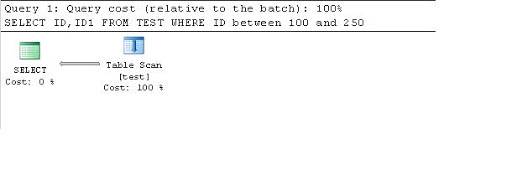
Plan
====
SELECT id,
id1
FROM test WITH (forceseek)
WHERE id BETWEEN 100 AND 250
Result
=====
(151 row(s) affected)
Table ‘test’. Scan count 1, logical reads 153, physical reads 0, read-ahead reads 0, lob logical reads 0, lob physical reads 0, lob read-ahead reads 0.
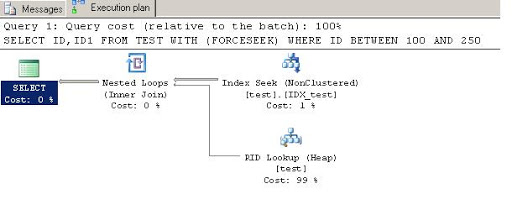
Plan
====
Here we can see first query is using Table Scan and taking more reads.
While second query is using index seek because of forceseek option and is taking less reads.
Cheers
Amish Shah
 Lets SQL
Leave a comment