Archive for September, 2009

DistinctCount — Analysis Service

September 22, 2009

Another Way for DistinctCount

As we all know that DistinctCount is a challenge for SSAS. Since its not an additive measure
AS needs additional efforts to get distinct count.


There are number of articles on how to optimize distinct count.
In general there we can get distinct count by two ways
1. Set aggregation usage of Distinctcount type while designing cube.
2. Using DistinctCount MDX Function

There are some alternate ways also available on how to count distinctcount
Lets look at another approach on how to get distinctcount.

Our problem is to get distinctcount of product sold by each reseller.

first we will get products for which orders are placed

nonempty([Product].[Product].members,[Measures].[Reseller Order Count])

Then we will count this number of products

count( nonempty([Product].[Product].members,[Measures].[Reseller Order Count]))
member [measures].[dc1]

Here it is count of individual products for which orders are placed and that is distinctcount for us also

WITH MEMBER [measures].[AlternateDistinctCount]
AS
COUNT( nonempty([Product].[Product].MEMBERS,[Measures].[Reseller Order Count]))
MEMBER [measures].[MDXDistinctCount]
AS
DISTINCTCOUNT({[Product].[Product].members*[Measures].[Reseller Order Count]})
SELECT {[measures].[AlternateDistinctCount],[measures].[MDXDistinctCount]} ON 0,
[Reseller].[Reseller].MEMBERS
ON 1
FROM [Adventure Works]
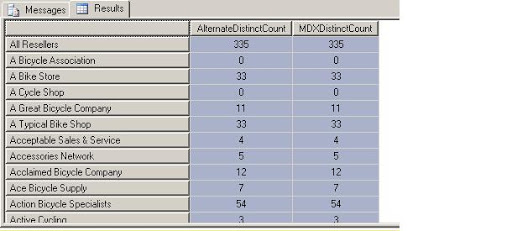
Lets verify the result

A Bike Store 33 33

A Bike Store has placed orders for 33 products

SELECT
[Reseller].[Reseller].&[1] ON 0,
NON EMPTY{[Product].[Product].MEMBERS*[Measures].[Reseller Order Count]} ON 1
FROM
[Adventure Works]
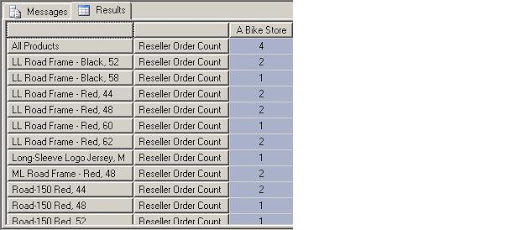
It shows orders placed for 33 products

AddCalculatedMembers – MDX

September 16, 2009

AddCalculatedMembers

By default when we create calculated members we can not see them while resolving member of a set.

for example we have a [test] member in bucket which is sum of bucket 0 and 1.

WITH MEMBER [Bucket].[Bucket].[test]
AS
([Bucket].[Bucket].&[0]+[Bucket].[Bucket].&[1])

Now if we run the query

WITH MEMBER [Bucket].[Bucket].[test]
AS
([Bucket].[Bucket].&[0]+[Bucket].[Bucket].&[1])
SELECT
[Bucket].[Bucket].MEMBERS ON 0
FROM [Adventure Works]

Its not resolving calculated member test whiile returning member of a set [Bucket].

But if we add ADDCALCULATEDMEMBERS then we can see the newly created calculated member.

WITH MEMBER [Bucket].[Bucket].[test]
AS
([Bucket].[Bucket].&[0]+[Bucket].[Bucket].&[1])
SELECT
ADDCALCULATEDMEMBERS( [Bucket].[Bucket].MEMBERS )on 0
FROM [Adventure Works]

In measures there are number of caclulated members , to see all calculated members

SELECT ADDCALCULATEDMEMBERS([MEASURES].MEMBERS) ON 0
FROM [Adventure Works]

IgnoreUnrelatedDimension Property – Analysis Service

September 13, 2009

Q:- In my fact table some dimension are related to some fact tables. For that dimension it shows same value for all attributes. I dont want to show values for this dimension.

Ans:- There is IgnoreUnrelateDimension property for measure group in dimension design cube.If you enable it then it will not show value for not related dimension to measure group. It will show null instead for that.

IsAggregatable Property – Analysis Service

September 13, 2009

Q:- I want to hide All in my dimension. How can I do it? Is it good to do it?

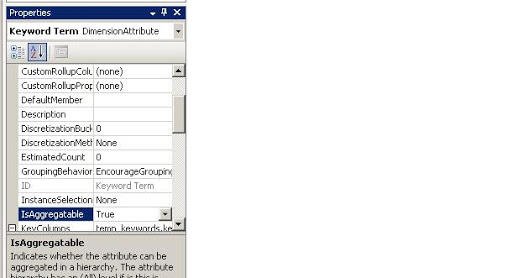
Ans:- In Analysis Service we generally see all dimension has All member. This is because of IsAggregatable property of the attribute. You can set its value to false, so that it will not show All member.

Its default member for that attribute. If you hide this member than you will have to set other attribute value to default member else it will pick some value as default and this will create confusion in browsing data if someone is not known to change in default member.

Its good to use it in ParentChild dimension where there is one root member in the hierarchy.

How to manage partition

September 13, 2009

Partition are useful function for managing large data in database. I have posted an article on how to create partition. Now we will look into how to manage partitions.

First we will create partition as given in my past article.


USE bi

CREATE PARTITION FUNCTION part_test_func(datetime) AS range LEFT FOR VALUES ('2008-09-10', '2008-09-20', '2008-09-30')

/* so it has range values like

<= '2008-09-10' > '2008-09-10 and <= '2008-09-20' > '2008-09-20 and <= '2008-09-30' >'2008-09-30'

*/

/* Now we need to map file group to each of this partition

Here first , second and third are filegroups */

CREATE PARTITION scheme part_test_scheme AS PARTITION part_test_func TO(FIRST, SECOND, third, FIRST)

/*Now we will cretae a table on this partition scheme */

CREATE TABLE part_test

(

id INT IDENTITY(1, 1),

data VARCHAR(100),

DATE DATETIME

)

ON part_test_scheme(DATE)

INSERT INTO part_test

VALUES ('a',

'2008-09-05')

INSERT INTO part_test

VALUES ('a',

'2008-09-15')

INSERT INTO part_test

VALUES ('a',

'2008-09-25')

INSERT INTO part_test

VALUES ('a',

'2008-10-05')

CREATE TABLE part_test_archive

(

id INT IDENTITY(1, 1),

data VARCHAR(100),

DATE DATETIME

)

ON part_test_scheme(DATE)

--Now as part of maintenance we want to move all data of september to archive table.

--We need to switch partition for range between '2008-09-01' and '2009-08-30'

DECLARE @partition_no_start INT

DECLARE @partition_no_last INT

SET @partition_no_start = bi.$partition.Part_test_func('2008-09-01')

SET @partition_no_last = bi.$partition.Part_test_func('2008-09-30')

SELECT @partition_no_start,

@partition_no_last

WHILE @partition_no_start <= @partition_no_last

BEGIN

Alter TABLE part_test switch PARTITION @partition_no_start TO part_test_archive PARTITION @partition_no_start

SET @partition_no_start = @partition_no_start + 1

END

--Lets verify movement of data

SELECT Min(DATE),

Max(DATE)

FROM part_test_archive

SELECT Min(DATE),

Max(DATE)

FROM part_test


Design a site like this with WordPress.com
Get started