Recently I got a problem of ranking based on a group.
Lets try to solve the same problem using Adventure Works cube.
We have details of customer country and customers. We want to rank them based on their internet sales. But we want the rank to be reset when the country changes.
In general rank will assign rank in ascending order , but we want to reset it when the country changes.
We have created a set [myset] for customer and country sorted on [Internet Sales Amount] and we will asign them a rank.
WITH
SET [myset] AS
ORDER(
{[Customer].[Country].[Country].MEMBERS* [Customer].[Customer].[Customer].MEMBERS}
,[Measures].[Internet Sales Amount],ASC)
MEMBER [Measures].[rank]
AS
RANK(([Customer].[Country].currentmember,[Customer].[Customer].CURRENTMEMBER),
[myset]
)
SELECT {[Measures].[Internet Sales Amount],[Measures].[rank]} ON 0 ,
[myset] ON 1
from [Adventure Works]
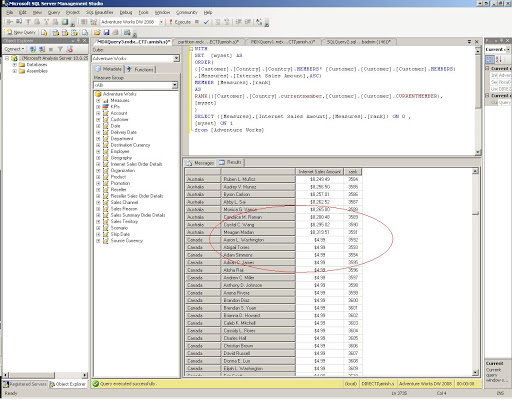
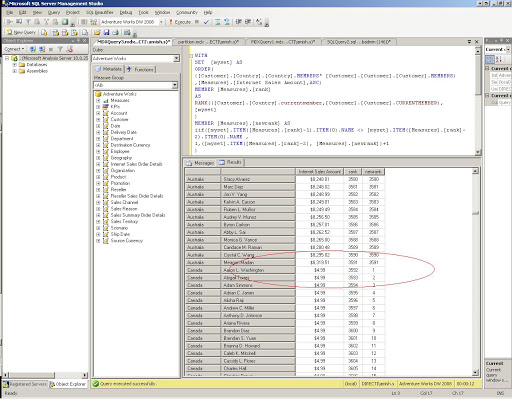
Here we can see the rank is in ascending for order for all customers irrespective of country. We want to reset this rank when the country changes. So we will create a new member
[Measures].[newrank]
WITH
SET [myset] AS
ORDER(
{[Customer].[Country].[Country].MEMBERS* [Customer].[Customer].[Customer].MEMBERS}
,[Measures].[Internet Sales Amount],ASC)
MEMBER [Measures].[rank]
AS
RANK(([Customer].[Country].currentmember,[Customer].[Customer].CURRENTMEMBER),
[myset]
)
MEMBER [Measures].[newrank] AS
iif([myset].ITEM([Measures].[rank]-1).ITEM(0).NAME <> [myset].ITEM([Measures].[rank]-2).ITEM(0).NAME ,
1,([myset].ITEM([Measures].[rank]-2), [Measures].[newrank])+1
)
SELECT {[Measures].[Internet Sales Amount],[Measures].[rank], [Measures].[newrank]} ON 0 ,
[myset] ON 1
from [Adventure Works]
 Lets SQL