Archive for February, 2011

get row count for a table SQL Server DMVs

February 20, 2011

In SQL 2000 you can get this informartion from sysindexes system table.
But we should not sysindexes in because it will be deprecated in future

After 2005 this information is stored with partition details   because table is logically atleast a single partition
This provides estimated row  count information based on last updated stats.


lets look with more details

SELECT Object_name(object_id),
       CASEindex_id
         WHEN 0 THEN ‘Heap’
         WHEN 1 THEN ‘Clustered’
       END,
       partition_id,
       object_id,
       index_id,
       rows,
       data_compression_desc
FROM   sys.partitions
WHERE  object_id > 100
       ANDindex_id IN ( 0, 1 )
ORDER  BY Object_name(object_id)

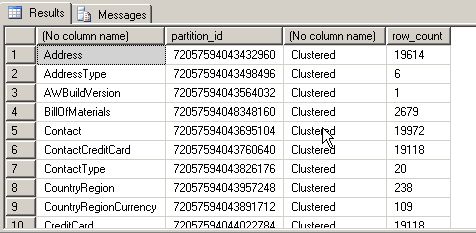
Same details we can get from sys.dm_db_partition_stats

SELECT Object_name (object_id),
       partition_id,
       CASEindex_id
         WHEN 0 THEN ‘Heap’
         WHEN 1 THEN ‘Clustered’
       END,
       row_count
FROM   sys.dm_db_partition_stats
WHERE  object_id > 100
       ANDindex_id IN ( 0, 1 )
ORDER  BY Object_name(object_id)
map login with users

February 20, 2011

When we restore backups to new server then users in the database are not mapped with their login in the new server
Its because sid is not matching.In this case we will are used to with sp_change_users_login
But this procedure will be deprectated in future version . So instead of this we should use alter user

alter user username
with
= new username,
,

So for mapping a user test with testlogi  we will use

ALTER USER test WITH login = testlogin

DMVs instead of DBCC Opentran

February 18, 2011

Those who are using SQL Server must be aware of dbcc opentran
After 2005 edition , SQL Server  is providing reach information in DMV.
For transactions 2 DMVs are available in SQL Server

1.dm_tran_database_transactions
Provide transaction information at database level
2.dm_tran_session_transactions
Provide transaction information at session level.

Lets look at how can we use it instead of dbcc opentran

first lets run

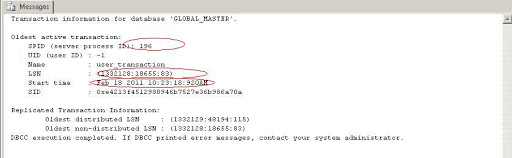
DBCC OPENTRAN


similar details we can get from DMVS , which provides much rich information thatn dbcc opentran

Lets look into this

SELECT dd.transaction_id,
       ds.session_id,
       database_transaction_begin_time,
       CASEdatabase_transaction_type
         WHEN 1 THEN ‘Read/write transaction’
         WHEN 2 THEN ‘Read-only transaction’
         WHEN 3 THEN ‘System transaction’
       ENDdatabase_transaction_type,
       CASEdatabase_transaction_state
         WHEN 1 THEN ‘The transaction has not been initialized.’
         WHEN 3 THEN ‘The transaction has been initialized but has not generated any log records.’
         WHEN 4 THEN ‘The transaction has generated log records.’
         WHEN 5 THEN ‘The transaction has been prepared.’
         WHEN10 THEN ‘The transaction has been committed.’
         WHEN11 THEN ‘The transaction has been rolled back.’
         WHEN12 THEN ‘The transaction is being committed. In this state the log record is being generated, but it has not been materialized or persisted’
       ENDdatabase_transaction_state,
       database_transaction_log_bytes_used,
       database_transaction_log_bytes_reserved,
       database_transaction_begin_lsn,
       database_transaction_last_lsn
FROM   sys.dm_tran_database_transactionsdd
       INNER JOIN sys.dm_tran_session_transactionsds
           ONds.transaction_id =dd.transaction_id
WHERE  dd.database_id = 5

We can see that this is much more information than we can get from dbcc opentran
with  same details its also provides database transaction type , database transaction state ,
log bytes used, log bytes reserved , lsn related details also

sys.dm_exec_procedure_stats DMV to get cached proc stats

February 15, 2011

We all are used to sys.dm_exec_query_stats which gives us useful information for queries running on the server.
Similarly in SQL 2008 we can get details for procedures. For this we will have to use sys.dm_exec_procedure_stats
It is supported in SQL 2008 and higher versions.

Its provides aggregated results for cached procedures since last the procedure was cached.If procedure is recompiled every time then its result will not have aggregated data.

Lets have some look into it.

SELECT TOP 10 *
FROM   sys.dm_exec_procedure_stats

SELECT Db_name(database_id)                   databaes_name,
       p.name                                 proc_name,
       p.type                                 proc_type,
       execution_count,
       total_physical_reads,
       total_physical_reads / execution_count avg_physical_reads,
       total_logical_reads,
       total_logical_reads / execution_count  avg_logical_reads,
       total_elapsed_time,
       total_elapsed_time / execution_count   avg_elapsed_time
FROM   sys.procedures p
       JOIN sys.dm_exec_procedure_stats d
           ON p.object_id = d.object_id
WHERE  d.database_id = Db_id()

Diana Lite , a good utility to study Execution Plan

February 14, 2011

I came across a utility Diana Lite by  Daniel Zrihen . It is developed by nobhillsoft. Its a good utility and I think its fun to work with it and its a freebie 🙂

So I thought I should share it with you guys.

Useful information we can get out of a query execution plan

Much has been written about Query Execution Plans (we’ll call them QEPs), and how they can be used
for analyzing how SQL Server interprets your TSQL code and what it does behind the scenes –
information you can use to do such things as find bottlenecks, build indexes where they might help,
and generally improve the performance of your code.

Well, we have found more uses for it. There is more information in the QEP, information that’s not
typically used, yet is highly useful and very easy to retrieve:

1. IS YOUR CODE BROKEN?

TSQL code can get ‘broken’ all the time. You might be referencing tables or columns that don’t exist.
They might have even existed at the time you wrote the procedure, but have been removed since,
leaving your procedure ‘broken’ – It will raise an error next time its executed. How many of those do
YOU have in your database?

Now, if a code is broken, SQL Server will let you know about that when attempting to retrieve its
execution plan. Strictly speaking, this is not QEP information. Its information you will get while trying
to get the QEP. And that is not the only way to get that information. But it’s the easiest.

2. WHAT ENTITIES ARE USED IN FOR WHAT OPERATION?

Among all the logical and physical operations, and effects on memory etc, QEP also contains the very
basic information of what entities it is working with, and what it does on such entities. This
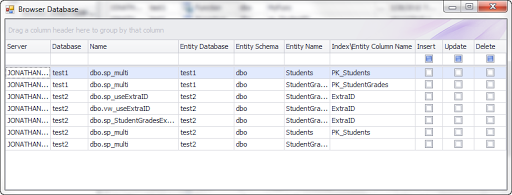
information can be then used to build a basic ‘browser database’, which you can use to answer
questions like: which code inserts to this table? I got data missing… which procedure removes records
from here?

In order to get any SQL’s execution plan in SQL Server, all you need to do is:

SET showplan_all ON

write your SQL here

SET showplan_all ON

If you get an error, this means the stored procedure is broken, and the error would say why.
Otherwise, you can get the execution plan in a tabular format, and retrieve the specific entities used
from it.

We put this functionality into one of our freebie products, Diana Lite. You can build the full ‘browser
database’ out of the collection of any database’s SQL Code, then easily filter it and get to whatever
you are looking for:

Sweet, Huh?


Design a site like this with WordPress.com
Get started