Archive for February, 2011

Use of resource governor to limit CPU usage for backup compression

February 6, 2011

Resource Governor

As many of you have gone through my previous article on compress backup
Since backup compression takes higher cpu it affect other processes

Here Resource Governor comes as a useful option , where we can configure use cpu for the selected
session.

Resource governor is a new feature in SQL Server 2008 which we can use to manage cpu usage/memory usage by different  operations.

Resource governor can be helpful in many cases we will look into it one by one

Today we will look into use of resource governor in backup compression

First we will create a user who is supposed to take backup named bkp_operator.
Then  we will have to enable resource governor.

Alter resource governor reconfigure

or in Management Studio

right click on resource governor and enable it
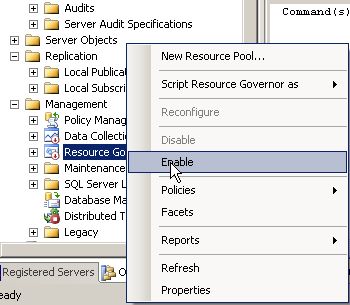
For resource governor we will have to create a resource pool

Right click on Resource pools select create new pool
create a new pool named p_40
set value of MAXIMUM  CPU% to 40
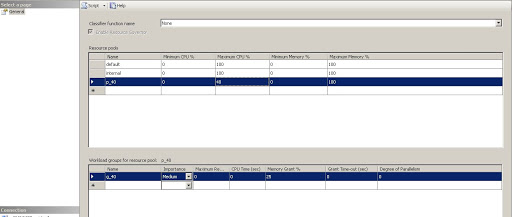
Or using TSQL

CREATE resource pool p_40
   WITH
(max_cpu_percent = 40);

create a workgroup g_40 that use this pool p_40

CREATE WORKLOAD GROUP g_40
USING p_40

Now create a classifier function that will use this group

CREATE FUNCTION dbo.Cpu_compression_for_backup()
returns SYSNAME
WITH schemabinding
AS
    BEGIN
        DECLARE@worklod_group AS SYSNAME
        IF ( Suser_name() = ‘bkp_operator’ )
            SET@worklod_group = ‘g_40’
        RETURN@worklod_group
    END;
go
ALTER RESOURCE GOVERNOR WITH (CLASSIFIER_FUNCTION= dbo.Cpu_compression_for_backup);
— Start Resource Governor
ALTER RESOURCE GOVERNOR RECONFIGURE;

Now when the user bkp_operator will backup database resource governor will assign only 40% cpu to this user .

Below are the query to system tables for resource governor
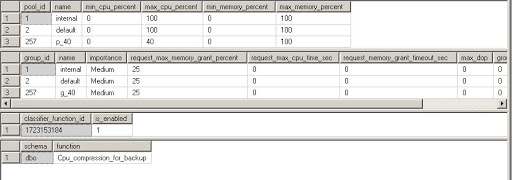
SELECT *
FROM   sys.resource_governor_resource_pools
SELECT *
FROM   sys.resource_governor_workload_groups
SELECT *
FROM   sys.resource_governor_configuration
SELECT Object_schema_name(classifier_function_id) AS [schema],
       Object_name(classifier_function_id)        AS[function]
FROM   sys.dm_resource_governor_configuration

Backup Compression

February 5, 2011

Backup compression
Its a new feature in SQL Server 2008 Enterprise Edition.
Its support to compress a backup , for which we had to use third party tools earlier.
This can help us to reduce backup size, which is a big problem for growing databases.
Since it compress backup while taking backup it puts additional overhead on the CPU.
Though using resource manager we can control use of CPU by the current session.

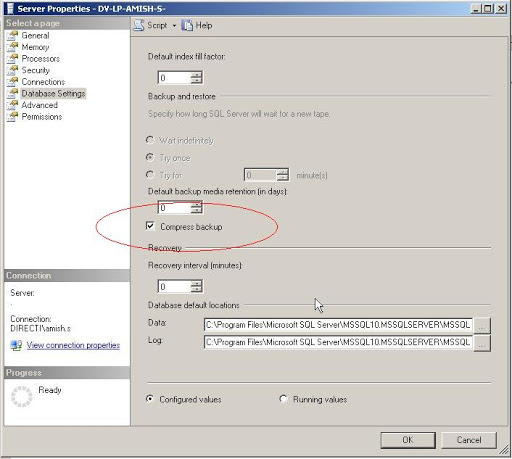
If we want to comress backup by default the we have to set this option at server level.
Here it shows how to set this at server level.

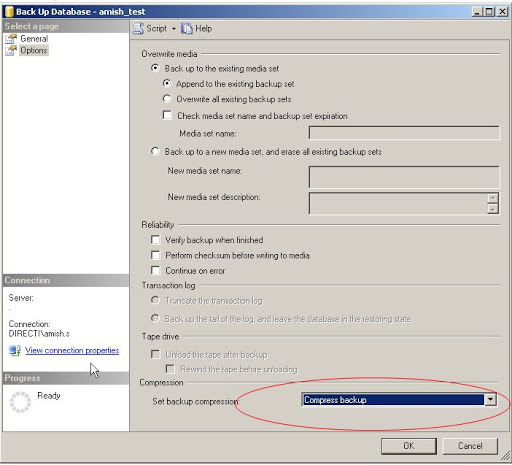
How ever we can also specify at database backup level while taking backup

We can get compression ration using this query in MSDB

img 3

SELECTbackup_size / compressed_backup_size,
       backup_size,
       compressed_backup_size
FROM   msdb..backupset
WHERE  database_name =‘amish_test’

Here the ratio is at 10.26 %, which shows backup is compressed 90%. 🙂

Here are considertions that we have to take care while taking backup
1. char  data is compressed  more than any other data.
2.If tables are compressed than backup compression will be less or not so much
3.It data is encrypted then also backup compression will be less or not so much


For more details please look into BOL .

compression part 2

February 3, 2011

Compression in partitions

We can set compression property for individual partition .

Below are the points that we have to take consideration for parition operation.

1.Merging
When two partitions are merged , resultant partition inherits compression property of destination
partition
2.merging
When two partitions are splitted , new partition will have data compression settings of source
partition
3.switching
When partitions switched between two tables both table have same data compression for the related
partition

Let see it with more examples

CREATE PARTITION FUNCTION part_function (datetime)
AS RANGE LEFT FOR VALUES (‘2011-01-01′,’2011-01-02′,’2011-01-03’) ;
GO

CREATE PARTITION SCHEME part_scheme
AS PARTITION part_function
TO ([primary], [primary] , [primary], [primary] ) ;
GO

CREATE TABLE sales
    (
         id           INT IDENTITY(1, 1),
         sales_date   DATETIME,
         product_id   INT,
         sales_amount INT
    )
ON part_scheme(sales_date)

SELECT *
FROM   sys.partitions
WHERE  object_id = Object_id (‘sales’)

ALTER TABLE sales
REBUILD  WITH (data_compression = page)

SELECT *
FROM   sys.partitions
WHERE  object_id = Object_id (‘sales’)

Now once again we rever data compression

ALTER TABLE sales
REBUILD  WITH (data_compression = NONE)

Now we  will different partition with different compression settings

ALTER TABLE sales
REBUILD PARTITION = ALL
WITH (data_compression = page on partitions (1,2),
     data_compression = row on partitions (3,4) )
or

ALTER TABLE sales
REBUILD PARTITION = ALL
WITH (data_compression = page on partitions (1 to 2),
     data_compression = row on partitions (3 to 4) )

now once again run query

SELECT *
FROM   sys.partitions
WHERE  object_id = Object_id (‘sales’)

Compression Part 1

February 3, 2011


If you are using Enterprise or Developer edition of SQL Server  2008 you can use compression on your server

What we can compress?
We can compress
Table
Index
Any partition from partition Table of Index. We can set different compression type for different partition

compression has two types
1.ROW
2.PAGE

Table compression and index compression are separate. Compressing  a table does not automatically compress index also

syntax for compression
1.
ALTER TABLE

REBUILD PARTITION = 1 WITH (DATA_COMPRESSION =  )

2.ALTER TABLE

REBUILD PARTITION = ALL
WITH (DATA_COMPRESSION = ON PARTITIONS(),
… )

Lets see it with Examples.

drop table sales

CREATE TABLE sales
    (
         salesid    INT IDENTITY(1, 1),
         product_id VARCHAR(50),
         amount     INT
    )
DECLARE @i INT
DECLARE @num INT
SET @num = 100
SET @i = 10
WHILE @i <= 100000
    BEGIN
        INSERT INTO sales
        SELECT ‘product’ + CONVERT(VARCHAR(10), CONVERT(INT, Rand() * @num)),
               Rand() * @i
        SET @i = @I + 1
    END
CREATE CLUSTERED INDEXidx_sales_porduct_id
    ON sales (product_id)
CREATE INDEX idx_sales_sales_id
    ON sales (salesid)
EXEC Sp_spaceused sales

SELECT *
FROM   sys.partitions
WHERE  object_id = Object_id(‘sales’)

It will show data compression as NONE

Now lets compress this table

ALTER TABLE sales
rebuild WITH (data_compression = page)
exec sp_spaceused sales

SELECT *
FROM   sys.partitions
WHERE  object_id = Object_id(‘sales’)

Now we can see data compression is PAGE

We can also specify data_compression while creating a table
Lets see

CREATE TABLE test
    (
         id   INT,
         data VARCHAR(100)
    )
with (data_compression = page)

estimate data saving by compression

February 1, 2011

Today I got a mail for how to get space saving estimation using compression

Well compression is supported in SQL Server 2008 Enterprise and Developer Edition.

We can have two type of compressions 1) Row 2) Page. I will give details in brief in coming articles. Our question is to know how much space can we save using compression?  We can get this answer using

sp_estimate_data_compression_savings procedure.

Syntax for proc is
sp_estimate_data_compression_savings
      @schema_name
     ,@object_name
     ,@index_id
     ,@partition_number
     ,@data_compression

sp_estimate_data_compression_savings
      @schema_name =’SALES’
     ,@object_name  =’SalesOrderDetail’
     ,@index_id =NULL
     ,@partition_number =NULL
     ,@data_compression = ‘ROW’

    
sp_estimate_data_compression_savings
      @schema_name =’SALES’
     ,@object_name  =’SalesOrderDetail’
     ,@index_id =NULL
     ,@partition_number =NULL
     ,@data_compression = ‘PAGE’
   

If index id is not passed it will show result for all indexes.
If partition id is null result for all partitions will be displayed.

It takes sample data into tempdb and calculates space saving using compression , and then gives result
Actual result may be differ on row size and fill factor  of index. But we can get rough estimation of space
saving using compression

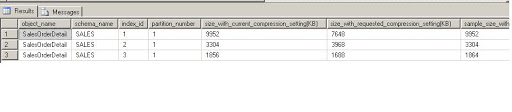
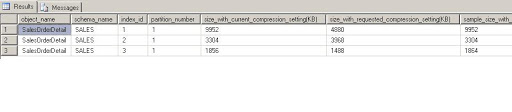
Result will show space used  for current data as well as after compression .
Here in sample we can see space saving using page compression is more than row . However each type has its own limitation , we can take decision depending on our requirement .


Design a site like this with WordPress.com
Get started