Archive for March, 2011

How to monitor replication subscription errors

March 31, 2011


 One of my client has a big setup Server for SQL Server. He also has a lot of transactional replication and monitoring its is a really problem for him. Frequently he has problem of out of sync replications or failed replication

Also sometimes if devs stop synchronizing replication and forget to start it. He need an alert for this. During this we setup number of processes to monitor this. I would like to share one of store proc for this which I think will be useful for all.


sp_replmonitorhelpsubscription

This helps too much to monitor subscriptions

From BOL

sp_replmonitorhelpsubscription  @publisher = ] ‘publisher’
    [ , [ @publisher_db = ] ‘publisher_db’ ]
    [ , [ @publication = ] ‘publication’ ]
    [ , [ @publication_type = ] publication_type ]
    [ , [ @mode = ] mode ]
    [ , [ @topnum = ] topnum ]
    [ , [ @exclude_anonymous = ] exclude_anonymous ]
    [ , [ @refreshpolicy = ] refreshpolicy ]

 @publisher Name of @publisher or default is null then  it will display for all publishers that use that distributor

 @publisher_db  Name of publisher Datatbase or is null then all publisher Datatbase

 @publication = Name of publication or default is NULL

 @publication_type

 0                 Transactional publication.
 1                 Snapshot publication.
 2                 Merge publication.
 NULL (default)  Replication tries to determine the publication type.

 @mode  This is most important parameter which serves our objective

0 (default)         Returns all subscriptions.
1                 Returns only subscriptions with errors.
This will give all subscription with errors
2                 Returns only subscriptions that have generated threshold metric warnings.
This will give all subscription which about to cross the  threshold metrics .
3                 Returns only subscriptions that either have errors or have generated threshold metric warnings.
This will give both 1 & 2
4                 Returns the top 25 worst performing subscriptions.
5                 Returns the top 50 worst performing subscriptions.
6                 Returns only subscriptions that are currently being synchronized.
7                 Returns only subscriptions that are not currently being synchronized
If we forgot to start synchronizing then this will help us to find this, with last synchronization time

Lets see one example  I Have modified the server name /db name .

EXECdistribution..Sp_replmonitorhelpsubscription
    @publisher =NULL— for all publisher
    ,
    @publication_type =0 — for trnasactional replications
    ,
    @mode =3 — All which have errors or threshold limit warning


Now I will stop synchronization for one subscription and we will get it

SELECT Getdate()
EXECdistribution..Sp_replmonitorhelpsubscription
    @publisher =NULL— for all publisher
    ,
    @publication_type =0 — for trnasactional replications
    ,
    @mode =7 — All where synchronization has stopped


 You can look into following procedures also , which are not so useful for me as of now but can give good information

sp_replmonitorhelppublisher
sp_replmonitorhelppublicationthresholds 
sp_replmonitorhelppublication 

SQL Server Downloads

March 28, 2011

As we are using SQL Server , we have to do number of download related to SQL Server
I have tried to gather all details together for us.


DMVs for Memory

March 27, 2011

Today we will look into DMVs related to memory

First we will look into sys.dm_os_sys_memory which will give us memory related basic informatio for the system
This will give us detail for physical memory, available memory , toatl page file and available page file and
high/low memory status. If  memory status is low then it means system is facing memory pressure.

SELECTtotal_physical_memory_kb / ( 1024.0 * 1024 )     total_physical_memory_gb,
       available_physical_memory_kb / ( 1024.0 * 1024 ) available_physical_memory_gb,
       total_page_file_kb / ( 1024.0 * 1024 )           total_page_file_gb,
       available_page_file_kb / ( 1024.0 * 1024 )       available_page_file_gb,
       system_high_memory_signal_state,
       system_low_memory_signal_state,
       system_memory_state_desc
FROM   sys.dm_os_sys_memory

dm_os_process_memory
This dmv is supprted on SQL 2008 and later versions
it provides some  more detailed information about memory in sql server
All details are in kb

SELECTphysical_memory_in_use_kb,
       large_page_allocations_kb,
       locked_page_allocations_kb,
       total_virtual_address_space_kb,
       virtual_address_space_reserved_kb,
       virtual_address_space_committed_kb,
       virtual_address_space_available_kb,
       page_fault_count,
       memory_utilization_percentage,
       available_commit_limit_kb,
       process_physical_memory_low,
       process_virtual_memory_low
FROM   sys.dm_os_process_memory

This will give us physical memory , locked page allocation (should be 0 if AWE is not enabled) ,
total , reserved, committed and available virtual address space, page fault count , memory utilization percentage and process physical memory low if the server is facing memory pressure

xp_readerrorlog parameter detail

March 19, 2011


Recently we had  hardware and performance issues on SQL Server,with our client , so while monitoring the system we also looked at error log. We used xp_readerrorlog procedure.
This is really useful procedure and I feel I should share some information for this undocumented store procedures


xp_readerrorlog  has four parameters

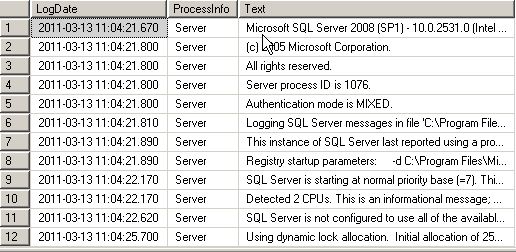
1.EXEC Xp_readerrorlog 0

here 0 stands for file number where latest file has 0 number and subsequent rolled over file has incremented  number. So this will display current errorlog file while incremented number will subsequent show rolled over file for

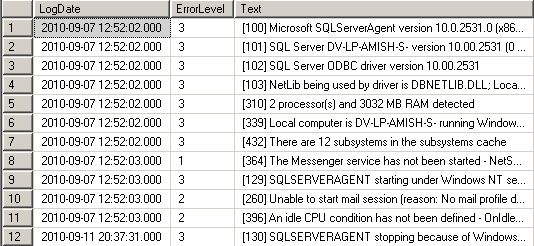
2.EXEC Xp_readerrorlog    0,   1

here secound parameter has two values
1. error log
2 agent log

yes we can get agent log also from this proc 🙂

EXEC Xp_readerrorlog    0,   1

EXEC Xp_readerrorlog    0,   1

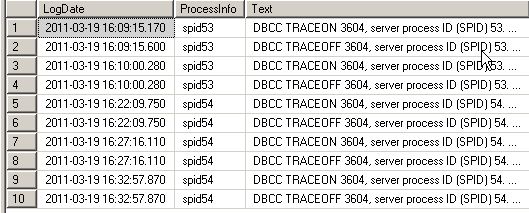
3.EXEC Xp_readerrorlog     0,    1,    ‘dbcc’

This will search for string which has ‘dbcc’ word in it

4.EXEC Xp_readerrorlog    0,    1,    ‘dbcc’,    ‘traceon’

this will filter result set more and give result which has both ‘dbcc’ and ‘traceon’ words in it

use procedure as input in dataflow task

March 17, 2011

If we use procedure as  source in data flow task , this generally dont work in SSIS
so we have to pass

SET nocount OFF
SET fmtonly OFF

 before running the procedure

So sql command will be like this

SET nocount OFF
SET fmtonly OFF
EXEC Proc1

cheers 🙂


Design a site like this with WordPress.com
Get started