Archive for May, 2013

Running sum simplified in SQL 2012

May 16, 2013


Running sum is a regular requirement in query for developer and many times developer has to run number  of complex  queries or self joins to get running sum
But now since SQL  2012 its very easy and funny and simplified.

Lets see this exciting but simple task
 

In 2012 we can use order by also while using aggregate window function. 
In 2008 we can use only partitioned by clause but now in SQL 2012 has simplified our task 

Lets see this 

  
 CREATE TABLE test
     (
          id    INT,
          value INT,
          statsdate date
     )
 DECLARE @i INT
 SET @i = 1
 WHILE @i <= 10
     BEGIN
         INSERTINTO test
         SELECT@i,
                @i *10,
                getdate()+ @i/3
         SET @i = @I + 1
     END
 SELECT *
 FROM   test
 
Running sum for entire table
 

We want to get running sum for all data in the table
 
 Here is the query 
WITH cte
     AS (SELECT *,
                Sum(value) OVER (ORDER BY id) AS runningsum
         FROM   test)
SELECT *
FROM   cte
Running sum reset on date

Now we want running sum but datewise
So when date changes we want to reset running sum
We have to use partition by clause using statsdate column
 
Here is the query
 

WITH cte
      AS (SELECT *,
                 Sum(value) OVER (ORDER BY id)  AS runningsum,
                 Sum(value) OVER (partition BYstatsdate ORDER BYid) ASrunningsum_partitioned
          FROM   test)
 SELECT *
 FROM   cte


Partial Backup

May 9, 2013

Partial Backup

We can use partial backup  while handling  large databases
Using partial backup we can take backup of only read write enabled filegroups instead of
all filegroups which are read_only.


As a large database we have possibility that some filegroups will have archived data which
is read_only and not updated frequently
We don’t need to take its backup regularly so using partial backup we can avoid taking its backup
frequently

Lets see how to take partial backup

We have a database named backup_test

We have two filegroups except [primary] named [FIRST] and [SECOND]

Here we have changed [SECOND]to read_only

We can take partial backup for this

Note:-  We have to define  “READ_WRITE_FILEGROUPS” while taking partial backup
        We cant take partial backup using management studio.

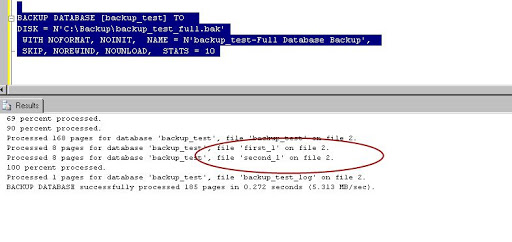
First we will take full backup which will include  files from all filegroups including files from [second]
filegroup which is read_only. We can see in below image


BACKUP DATABASE [backup_test]  TO 
DISK = N’C:\Backup\backup_test_full.bak’
WITH NOFORMAT, NOINIT,  NAME = N’backup_test-Full Database Backup’,SKIP, NOREWIND, NOUNLOAD,  STATS = 10

so now onwards we need to take backup of primary and first filegroups  which are read write enabled
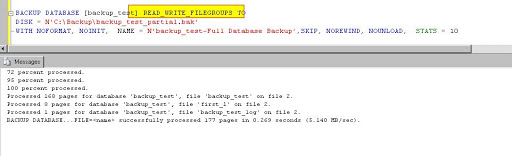
Now we will take partial backup. Here files from [SECOND] filegroups are not included.


BACKUP DATABASE [backup_test] READ_WRITE_FILEGROUPS TO 
DISK = N’C:\Backup\backup_test_partial.bak’
WITH NOFORMAT, NOINIT,  NAME = N’backup_test-Full Database Backup’,SKIP, NOREWIND, NOUNLOAD,  STATS = 10
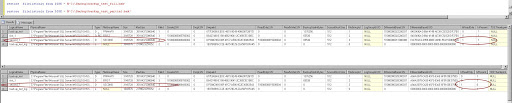
Now lets see file details from backup 


RESTORE filelistonly FROM DISK = N’C:\Backup\backup_test_full.bak’
RESTORE filelistonly FROM DISK = N’C:\Backup\backup_test_partial.bak’

Here we can see that  files from [SECOND] filegroup is not included, value of ispresent = 0 for [second_1] file from [SECOND] filegroup in partial backup while  its included  in full backup
 

Copy only backup option

May 8, 2013


copy_only option for backup

Its a useful feature but very few are aware of this option .

As we all are aware of backups and its different types
We are aware of backup strategies which include backup chain of full,differential and log backups


But some times we need to go out of box and need a separate backup.
Lets say we need a copy of live db to test servers but if we take a full backup it will break the sequence
of backup. Lets see the example

FULL1
      Diff1
      Diff2
FULL2
      Diff3
 Full-3 (we need this full backup to restore db on test server)
           If not specify as copy_only this will break current sequence and will work as differential base for next differential backup
      Diff4
                 
But if we specify as copy_only for FULL-3 full backup , it will not update bitmap for differential
and will not work as differential base. Diff4 will have all changed data  after Full-2 instead of Full-3

Here we have database backup_test_db
we take first its full backup

SELECT *
FROM   sys.database_files
Here differential_base_guid,differential_base_lsn,differential_base_time values are null
 

Now we will take first full backup


 BACKUP DATABASE [backup_test_db] TO
DISK = N’C:\Program Files\Microsoft SQL Server\MSSQL10.MSSQLSERVER\MSSQL\Backup\backup_test_db_1.bak’
WITH NOFORMAT, NOINIT, NAME = N’backup_test_db-Full Database Backup’, SKIP, NOREWIND, NOUNLOAD, STATS = 10
Here differential_base_guid,differential_base_lsn,differential_base_time values are updated
SELECT FILE_ID,
       name,
       differential_base_guid,
       differential_base_lsn,
       differential_base_time
FROM   sys.database_files
Now we will add another table


CREATE TABLE test
    (
         id INT
    )
 
Now again we will take full backup
Here differential_base_guid,differential_base_lsn,differential_base_time will be changed as database is changed

BACKUP DATABASE [backup_test_db] TO
DISK = N’C:\Program Files\Microsoft SQL Server\MSSQL10.MSSQLSERVER\MSSQL\Backup\backup_test_db_2.bak’
WITH NOFORMAT, NOINIT, NAME = N’backup_test_db-Full Database Backup’, SKIP, NOREWIND, NOUNLOAD, STATS = 10

SELECT FILE_ID,
       name,
       differential_base_guid,
       differential_base_lsn,
       differential_base_time
FROM   sys.database_files

Now again we will add new table

CREATE TABLE test1
    (
         id INT
    )
 

Now we want to take full backup again but its for purpose of restoring on test server 
and don’t want to break backup sequence with new backup .
Here we will specify copy_only option , so value of   differential_base_guid, differential_base_lsn,differential_base_timewill not be changed.

BACKUP DATABASE [backup_test_db] TO
DISK = N’C:\Program Files\Microsoft SQL Server\MSSQL10.MSSQLSERVER\MSSQL\Backup\backup_test_db_3.bak’
WITH COPY_ONLY , NOFORMAT, NOINIT, NAME = N’backup_test_db-Full Database Backup’, SKIP, NOREWIND, NOUNLOAD, STATS = 10

SELECT FILE_ID,
       name,
       differential_base_guid,
       differential_base_lsn,
       differential_base_time
FROM   sys.database_files

So here if we take differential backup again it will behave like copy_only backup does not exist and backup
 all data since second backup

Design a site like this with WordPress.com
Get started