Archive for the ‘Analysis Service’ Category

Problem in adding user in security page in Analysis Service

July 25, 2012

Recently we had a problem for adding users in Analysis service security option

But we got error while adding user

The following system error occurred:No mapping between account name and security IDs was done.

So we could not add or remove any user in analysis service.

 The error was there is user ID  S-1-5-21-3915353168-1605177054-2951684922-2242

 which is not in Domain or USERS. So it was failing for validation for it.
 So we removed S-1-5-21-3915353168-1605177054-2951684922-2242
it then successfully able to add user in security page.
 

Running Total handling Null Values

January 26, 2012

SQL Server 2008 R2 Analysis Services operations guide

June 11, 2011

Microsoft has releases Analysis Service 2008 R2 operations guide. 
This can be quite useful to understand new feature and optimizations in 2008 R2 edition. 
We can download it from 


http://msdn.microsoft.com/en-us/library/hh226085.aspx 

This white paper describes how operations engineers can test, monitor, capacity plan, and troubleshoot Microsoft SQL Server Analysis Services OLAP solutions in SQL Server 2005, SQL Server 2008, and SQL Server 2008 R2.

Detach DB in SSAS

March 22, 2010

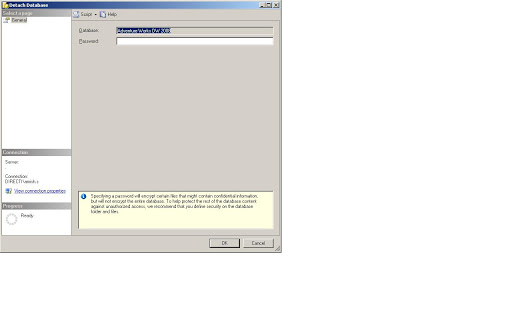
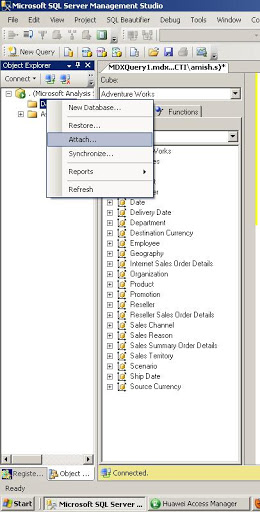
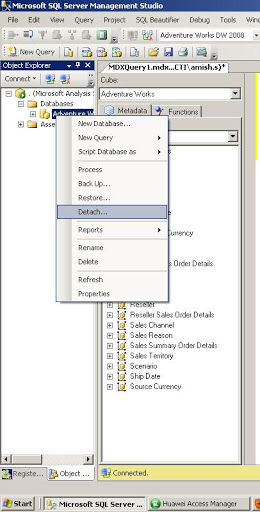
Detach and attach DB in Analysis Service

Now in Analysis Service 2008 its possible to detach and attach database.
Its make easy to move database to different location which was not so easy in past

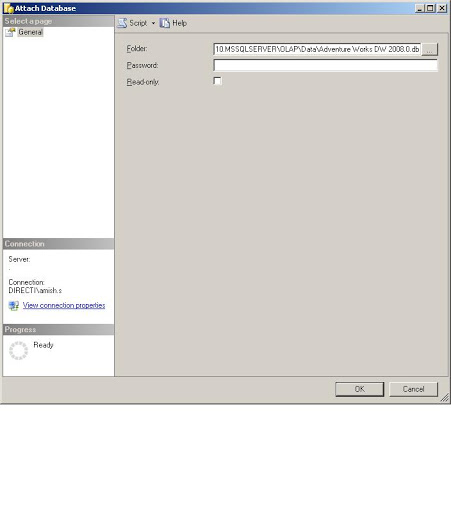
lets see how we can do it

If we want to attach it we hvae to give path of folder where the cube is stored.

How to backup multiple database using XMLA in one batch

January 20, 2010

Recently I got a question on how to backup multiple database using XMLA in one batch.

&sp;Lets see the problem

Here are two XMLA scripts for backup databases

  <Backup xmlns=”http://schemas.microsoft.com/analysisservices/2003/engine”&gt;
    
    <File>adv1.abf</File>
    <AllowOverwrite>true</AllowOverwrite>
  </Backup>

  <Backup xmlns=”http://schemas.microsoft.com/analysisservices/2003/engine”&gt;
    
    <File>mine1.abf</File>
    <AllowOverwrite>true</AllowOverwrite>
  </Backup>

Here when you run this query in XMLA query window it will give error

Executing the query …
The ‘Backup’ element at line 15, column 76 (‘http://schemas.microsoft.com/analysisservices/2003/engine&#8217; namespace) appears more than once under Envelope/Body/Execute/Command.
Execution complete

so we need to run it in batch. In batch we can run multiple XMLA query. But since this is backup we can not run it in transaction. So we have to specify transaction as false in the query

So the new query will be

<Batch xmlns=”http://schemas.microsoft.com/analysisservices/2003/engine” Transaction=”false” &gt;

  <Backup xmlns=”http://schemas.microsoft.com/analysisservices/2003/engine”&gt;
    
    <File>adv1.abf</File>
    <AllowOverwrite>true</AllowOverwrite>
  </Backup>

  <Backup xmlns=”http://schemas.microsoft.com/analysisservices/2003/engine”&gt;
    
    <File>mine1.abf</File>
    <AllowOverwrite>true</AllowOverwrite>
  </Backup>

</Batch>

Cheers
Amish Shah


Design a site like this with WordPress.com
Get started