Archive for the ‘Analysis Service’ Category

Discover Method Part 1

November 21, 2009

DISCOVER METHODS
They are very rich source for getting meta data information for the server.
Lets look for more detail on DISCOVER METHODS

Provides information for commands

SELECT *
FROM SYSTEMRESTRICTSCHEMA(
$SYSTEM.DISCOVER_COMMANDS
)

Provides resource usage information for current running or last executed command.From command_text column we can get query for the session.

You can get more information from here

http://msdn.microsoft.com/en-us/library/bb934103.aspx

Provides information for connections.

SELECT *
FROM SYSTEMRESTRICTSCHEMA(
$SYSTEM.DISCOVER_CONNECTIONS
)

Provides information related to connection.
Useful column will be connection_host_name which will provide ip of the connection, connection host application.

You can get more information from here

http://msdn.microsoft.com/en-us/library/bb934105.aspx

Provides information for datasources

SELECT *
FROM SYSTEMRESTRICTSCHEMA(
$SYSTEM.DISCOVER_DATASOURCES
)

But this one will not give results using select command.

You can get the results with using DISCOVER method.

<Envelope xmlns=”http://schemas.xmlsoap.org/soap/envelope/”&gt;
<Header />
<Body>
<Discover xmlns=”urn:schemas-microsoft-com:xml-analysis”>
<RequestType>DISCOVER_DATASOURCES</RequestType>
<Restrictions>
<RestrictionList />
</Restrictions>
<Properties>
<PropertyList />
</Properties>
</Discover>
</Body>
</Envelope>

You can get more information from here

http://msdn.microsoft.com/en-us/library/ms126129.aspx

To get information for current instance

SELECT *
FROM SYSTEMRESTRICTSCHEMA(
$SYSTEM.DISCOVER_INSTANCES
,INSTANCE_NAME=’sseight’
)

You can get more information from here

http://msdn.microsoft.com/en-us/library/ms126129.aspx

Provides information for the active jobs running on the server

SELECT *
FROM SYSTEMRESTRICTSCHEMA (
$SYSTEM.DISCOVER_JOBS
)

You can get more information from here
http://msdn.microsoft.com/en-us/library/bb934102.aspx

Provides information for all keywords reserved by provider

SELECT *
FROM SYSTEMRESTRICTSCHEMA (
$SYSTEM.DISCOVER_KEYWORDS
)

You can get more information from here

http://msdn.microsoft.com/en-us/library/ms126063.aspx

Provides information for locks

SELECT *
FROM SYSTEMRESTRICTSCHEMA (
$SYSTEM.DISCOVER_LOCKS
)

SELECT *
FROM SYSTEMRESTRICTSCHEMA (
$SYSTEM.DISCOVER_LOCKS,
LOCK_STATUS =’1′
)

— 0 Granted locks
— 1 Waiting locks
Another useful column in lock_type

You can get more information from here
http://msdn.microsoft.com/en-us/library/bb934104.aspx

Provides information for memory usage by objects

SELECT *
FROM SYSTEMRESTRICTSCHEMA (
$SYSTEM.DISCOVER_OBJECT_MEMORY_USAGE
)
ORDER BY OBJECT_MEMORY_NONSHRINKABLE DESC

You can get more information from here
http://msdn.microsoft.com/en-us/library/bb934098.aspx

Provides information about the standard and provider-specific properties

SELECT *
FROM SYSTEMRESTRICTSCHEMA (
$SYSTEM.DISCOVER_PROPERTIES
)
You can get more information from here
http://msdn.microsoft.com/en-us/library/ms126045.aspx
Gemini Renamed as PowerPivot

October 25, 2009

hi friends
Who are working with analysis service must be aware of Gemini.Its addon for Excel 2010 for users to handle large amount of data and analysis them , a self service BI
This project is now renamed as PowerPivot
We can get more information over here
http://www.powerpivot.com/

DRILLTHROUGH – Analysis Service

October 22, 2009

DRILLTHROUGH [MAXROWS Unsigned_Integer]
select mdx statement
Return set of attributes and measures

Its used to get detailed information from a cell of aggregated result
If storage is MOLAP then detailed information will be retrived from the cube. If its ROLAP then information will be retrieved from table of source database

MAXROWS is maximum number of rows that will be returned from source table
IF not specified then all rows will be returned

Cube dimension will are preceded by $ to separate them from measures

following information can be retrieved using drill through

Name(attribute_name)
Returns the name of the specified attribute member.

UniqueName(attribute_name)
Returns the unique name of the specified attribute member.

Key(attribute_name[, N])
Returns the key of the specified attribute member, where N specifies column in the composite key (if any). The default value for N is 1.

Caption(attribute_name)
Returns the caption of the specified attribute member.

MemberValue(attribute_name)
Returns the member value of the specified attribute member.

Translation(attribute_name[, N])
Returns the translated value of the specified attribute member, where N is the language.

CustomRollup(attribute_name)
Returns the custom rollup expression of the specified attribute member.

CustomRollupProperties(attribute_name)
Returns the custom rollup properties of the specified attribute member.

UnaryOperator(attribute_name)
Returns the unary operator of the specified attribute member.

Lets take an example

We want row detail for fourth quarter of year 2004

DRILLTHROUGH maxrows 1000
SELECT ([Date].[Calendar].[Calendar Quarter].&[2002]&[4]
)
ON 0
FROM [Adventure Works]
RETURN
[$Date].[Date] AS CALENDAR_DATE
,KEY([$Product].[Model Name]) AS PRODUCTKEY
,NAME([$Employee].[Employee]) AS EMPLOYEENAME
,UNIQUENAME([$Employee].[Employee]) AS EMPLOYEE_UNIQUE_NAME
,CAPTION([$Employee].[Employee]) AS EMPLOYEE_CAPTION
,MEMBERVALUE([$Employee].[Employee]) AS EMPLOYEE_MEMBERVALUE
,[$Geography].[Country] AS COUNTRY
,[Reseller Sales].[Reseller Sales Amount] AS RESELLER_SALES_AMOUNT
,[Reseller Sales].[Reseller Tax Amount] AS RESELLER_TAX_AMOUNT
,[Reseller Sales].[Reseller Standard Product Cost] AS
RESELLER_STANDARD_PRODUCT_COST

DistinctCount — Analysis Service

September 22, 2009

Another Way for DistinctCount

As we all know that DistinctCount is a challenge for SSAS. Since its not an additive measure
AS needs additional efforts to get distinct count.


There are number of articles on how to optimize distinct count.
In general there we can get distinct count by two ways
1. Set aggregation usage of Distinctcount type while designing cube.
2. Using DistinctCount MDX Function

There are some alternate ways also available on how to count distinctcount
Lets look at another approach on how to get distinctcount.

Our problem is to get distinctcount of product sold by each reseller.

first we will get products for which orders are placed

nonempty([Product].[Product].members,[Measures].[Reseller Order Count])

Then we will count this number of products

count( nonempty([Product].[Product].members,[Measures].[Reseller Order Count]))
member [measures].[dc1]

Here it is count of individual products for which orders are placed and that is distinctcount for us also

WITH MEMBER [measures].[AlternateDistinctCount]
AS
COUNT( nonempty([Product].[Product].MEMBERS,[Measures].[Reseller Order Count]))
MEMBER [measures].[MDXDistinctCount]
AS
DISTINCTCOUNT({[Product].[Product].members*[Measures].[Reseller Order Count]})
SELECT {[measures].[AlternateDistinctCount],[measures].[MDXDistinctCount]} ON 0,
[Reseller].[Reseller].MEMBERS
ON 1
FROM [Adventure Works]

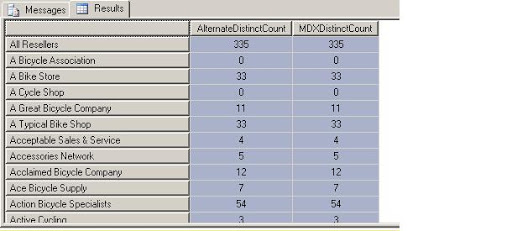
Lets verify the result

A Bike Store 33 33

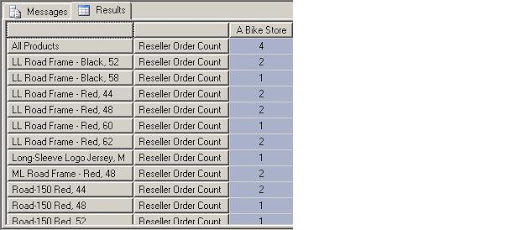
A Bike Store has placed orders for 33 products

SELECT
[Reseller].[Reseller].&[1] ON 0,
NON EMPTY{[Product].[Product].MEMBERS*[Measures].[Reseller Order Count]} ON 1
FROM
[Adventure Works]

It shows orders placed for 33 products

IgnoreUnrelatedDimension Property – Analysis Service

September 13, 2009

Q:- In my fact table some dimension are related to some fact tables. For that dimension it shows same value for all attributes. I dont want to show values for this dimension.

Ans:- There is IgnoreUnrelateDimension property for measure group in dimension design cube.If you enable it then it will not show value for not related dimension to measure group. It will show null instead for that.


Design a site like this with WordPress.com
Get started