Archive for the ‘SQL 2008’ Category

Compression Part 1

February 3, 2011


If you are using Enterprise or Developer edition of SQL Server  2008 you can use compression on your server

What we can compress?
We can compress
Table
Index
Any partition from partition Table of Index. We can set different compression type for different partition

compression has two types
1.ROW
2.PAGE

Table compression and index compression are separate. Compressing  a table does not automatically compress index also

syntax for compression
1.
ALTER TABLE

REBUILD PARTITION = 1 WITH (DATA_COMPRESSION =  )

2.ALTER TABLE

REBUILD PARTITION = ALL
WITH (DATA_COMPRESSION = ON PARTITIONS(),
… )

Lets see it with Examples.

drop table sales

CREATE TABLE sales
    (
         salesid    INT IDENTITY(1, 1),
         product_id VARCHAR(50),
         amount     INT
    )
DECLARE @i INT
DECLARE @num INT
SET @num = 100
SET @i = 10
WHILE @i <= 100000
    BEGIN
        INSERT INTO sales
        SELECT ‘product’ + CONVERT(VARCHAR(10), CONVERT(INT, Rand() * @num)),
               Rand() * @i
        SET @i = @I + 1
    END
CREATE CLUSTERED INDEXidx_sales_porduct_id
    ON sales (product_id)
CREATE INDEX idx_sales_sales_id
    ON sales (salesid)
EXEC Sp_spaceused sales

SELECT *
FROM   sys.partitions
WHERE  object_id = Object_id(‘sales’)

It will show data compression as NONE

Now lets compress this table

ALTER TABLE sales
rebuild WITH (data_compression = page)
exec sp_spaceused sales

SELECT *
FROM   sys.partitions
WHERE  object_id = Object_id(‘sales’)

Now we can see data compression is PAGE

We can also specify data_compression while creating a table
Lets see

CREATE TABLE test
    (
         id   INT,
         data VARCHAR(100)
    )
with (data_compression = page)
estimate data saving by compression

February 1, 2011

Today I got a mail for how to get space saving estimation using compression

Well compression is supported in SQL Server 2008 Enterprise and Developer Edition.

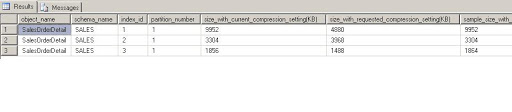
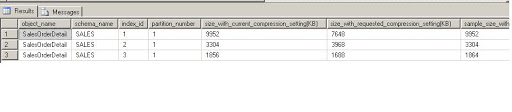
We can have two type of compressions 1) Row 2) Page. I will give details in brief in coming articles. Our question is to know how much space can we save using compression?  We can get this answer using

sp_estimate_data_compression_savings procedure.

Syntax for proc is
sp_estimate_data_compression_savings
      @schema_name
     ,@object_name
     ,@index_id
     ,@partition_number
     ,@data_compression

sp_estimate_data_compression_savings
      @schema_name =’SALES’
     ,@object_name  =’SalesOrderDetail’
     ,@index_id =NULL
     ,@partition_number =NULL
     ,@data_compression = ‘ROW’

    
sp_estimate_data_compression_savings
      @schema_name =’SALES’
     ,@object_name  =’SalesOrderDetail’
     ,@index_id =NULL
     ,@partition_number =NULL
     ,@data_compression = ‘PAGE’
   

If index id is not passed it will show result for all indexes.
If partition id is null result for all partitions will be displayed.

It takes sample data into tempdb and calculates space saving using compression , and then gives result
Actual result may be differ on row size and fill factor  of index. But we can get rough estimation of space
saving using compression

Result will show space used  for current data as well as after compression .
Here in sample we can see space saving using page compression is more than row . However each type has its own limitation , we can take decision depending on our requirement .


Merge Statement – SQL Server 2008

February 1, 2011

I am going to tell you about the new feature in Sql server 2008 “MERGE”statement.

It is used to perform insert , update, delete statement in a single query on a target table by joining to a source table

Earlier versions of MSSQL , when Merge statement was not present we had to run multiple operation of update/insert/delete 
on a table to synchronize it with other table
With Merge we can do it in a single query.

Lets try to understand it with an Example

Here is the syntax for Merge Statement from Books Online

MERGE
        [ TOP ( expression ) [ PERCENT ] ]
        [ INTO ] target_table [ WITH ( ) ] [ [ AS ] table_alias ]
        USING

        ON
        [ WHEN MATCHED [ AND ]
            THEN ]
        [ WHEN NOT MATCHED [ BY TARGET ] [ AND ]
            THEN ]
        [ WHEN NOT MATCHED BY SOURCE [ AND ]
            THEN ]
        [ ]
        [ OPTION ( [ ,…n ] ) ]   
;

MERGE clause specify target table on which insert/update/delete operation runs
USING clause specify the source used to join with target table
WHEN MATCHED is equal to inner join . Where target table rows are updtaed/ deleted which are matched to source table
depeneding on merge search condition .
We can have atmost two WHEN MATCHED  caluse , with first caluse with an additional searchcondition

Lets see example of WHEN MATCHED

we have 2 tables

1) sales  (Source table)
2) inventory (target table)

when the sales happens then, the quantity of the sales gets reduced from inventory balance.

CREATE TABLE Inventory
(
     product_id     INT IDENTITY(1,1)
    ,product_name   VARCHAR(50)
    ,quantity        INT
    ,description    VARCHAR(50)   
    ,creation_date  DATETIME
    ,updation_date  DATETIME        

)

INSERT INTO Inventory (product_name,quantity,description,creation_date,updation_date)
SELECT ‘T-Shirt’,10,’Polo T-Shirt’,getdate(),getdate()
UNION
SELECT ‘Shirt’,10,’Parks Casual Shirt’,getdate(),getdate()
UNION
SELECT ‘Jeans’,10,’Levis’,getdate(),getdate()
UNION
SELECT ‘Belt’,10,’Dockers’,getdate(),getdate()

CREATE TABLE Sales
(
     sales_id      INT IDENTITY
    ,product_id    INT
    ,quantity      INT
    ,creation_date DATETIME
    ,updation_date DATETIME
)   

Insert Sales (product_id,quantity,creation_date,updation_date)
SELECT 1,5,getdate(),getdate()
UNION
SELECT 2,10,getdate(),getdate()
UNION
SELECT 3,5,getdate(),getdate()
UNION
SELECT 4,5,getdate(),getdate()

Now we will have to synchronize  the inventory  with sales table
Since product 2 (shirts) all are sold then we will have to delete its rows from inventory and
for all other we will subtract sales quantity from inventory quantity

syntax using example:-

select * from Inventory
select * from Sales

MERGE Inventory as I
USING Sales as S on I.product_id = S.product_id
WHEN MATCHED and I.quantity – S.quantity <= 0
    THEN
        DELETE
WHEN MATCHED and I.quantity – S.quantity > 0
    THEN
    UPDATE
    SET  I.quantity = I.quantity – S.quantity
        ,I.updation_date = getdate()

OUTPUT
$action
, deleted.product_id , deleted.quantity
, inserted.product_id , inserted.quantity ;

select * from Inventory
select * from Sales   

Notes:-
A MERGE statement must be terminated by a semi-colon (;).
$action will give type of operation (insert/update/delete)

Comound Operators SQL Server 2008

January 31, 2011

SQL 2008 now supports compound operators, which is available in other databases since long time

x += 2
is equivalent to x = x+2

Below are the compound operators which are supported by sql server
+=
-=
*=
/=
%=
&=
^=
|=

We can also assign values while declaring variable.
DECLARE @x INT
SET @x = 135

which can be rewritten as
DECLARE @x1 INT = 135

lets see an example

DECLARE @x1 INT
SET @x1 = 135
SET @x1 = @x1 + 2
SELECT @x1

which can be rewritten as

DECLARE @x1 int = 135;
SET @x1 += 2
SELECT @x1

Data Compression Results

September 8, 2010

SQL 2008 is supporting data compression.

Its a new feature in SQL 2008 which is not available in previous versions

Data compression has two types
1. Page Compression
2.Row Compression

We will discuss it in detail in coming section

Today I want to discuss the results we have achieved using data compression

Here are the result for tables after compression
                    size after compression    size before compression Time for
                    in GB                             in GB                             Compress
                                                                                              
table1                253                        525                                 28 Hrs
table2                230                        515                                 25 Hrs
table3                220                        469                                 24 Hrs   

Time taken to compression was double compare to uncompressed tables. Also time taken to create index is also double than time to create normal index

But after compression query performance improves 50%
This was because of reduced I/O due to reduced size of tables.


Design a site like this with WordPress.com
Get started