Archive for the ‘SQL 2008’ Category

Forceseek- Table Hint SQL 2oo8

July 31, 2009

Forceseek

It forces optimizer to use index seek only. Sometimes optimizer does not user proper plan and use index scan which cause high reads on the system. We can use forceseek here to force otpimizer to use index seek which can give better performance.

Lets see one example


CREATE TABLE test

(

id INT,

id1 INT

)

DECLARE @I INT

SET @I = 1

WHILE @I <= 100000

BEGIN

INSERT INTO test

VALUES (@I,

@I + 1)

SET @I = @I + 1

END


SET statistics io ON

SELECT id,

id1

FROM test

WHERE id BETWEEN 100 AND 250

Result
=====
(151 row(s) affected)
Table ‘test’. Scan count 1, logical reads 221, physical reads 0, read-ahead reads 0, lob logical reads 0, lob physical reads 0, lob read-ahead reads 0.

Plan
====

SELECT id,

id1

FROM test WITH (forceseek)

WHERE id BETWEEN 100 AND 250


Result
=====
(151 row(s) affected)
Table ‘test’. Scan count 1, logical reads 153, physical reads 0, read-ahead reads 0, lob logical reads 0, lob physical reads 0, lob read-ahead reads 0.

Plan
====
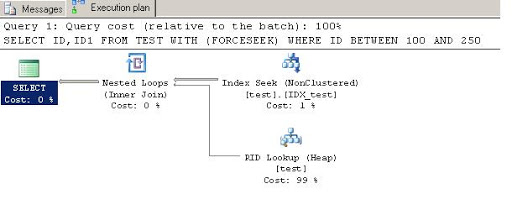
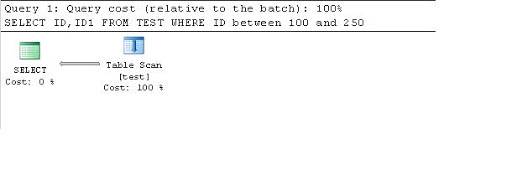
Here we can see first query is using Table Scan and taking more reads.
While second query is using index seek because of forceseek option and is taking less reads.

Cheers
Amish Shah

Index Suggestion by Query Execution Plan – SQL Server 2008

July 16, 2009

I hope many of us we have start to use SQL Server 2oo8. SQL Server 2oo8 comes with many silent features. We all are familiar of execution plan of a query. We are getting visual display of query execution and cost of each action. Its very useful to understand how query will be executed.

Now let us see how its more improved in SQL Server 2oo8

In SQL Server 2oo8 it also suggest missing index and shows how much it will benefit after creating index.

Lets look at Example


CREATE TABLE testtable (

id INT,

id1 INT,

data VARCHAR(100))

DECLARE @id INT

SET @id = 1

WHILE @id <= 10000

BEGIN

INSERT INTO testtable

VALUES (@id,@id * 2,'data' + Convert(VARCHAR(10),@id))

SET @id = @id + 1

END

SELECT data,

Count(* )

FROM testtable

WHERE id IN (10,34,2452,234,

234,2344,2345,653,

345)

AND data LIKE '%4%'

GROUP BY data

Now press CTRL + L

Here it shows suggested index in green and also shows how much it will benefit us after creating query.Now press left click in menu there is option to create script for index.


After clicking on it, it will show us script of suggested index

Merge 2- SQL Server 2008

July 10, 2009


I have given basic details about merge command in my first article

Merge SQL Server 2008

Now we will go some more advance in it. As we know we can do all update /insert / delete operation on a single table using merge command in a single query. Now using output we can store all this details. Also SQL Server 2008 supports new command $action which will give us information about operation done on the table.
Here we will store inserted / updated / deleted data in a separate table using output clause. Also we will store action related to that data.

DECLARE @t1 TABLE(

id INT PRIMARY KEY,

code VARCHAR(10)

)

DECLARE @t2 TABLE(

id INT PRIMARY KEY,

code VARCHAR(10)

)

DECLARE @t1changed TABLE(

ACTION VARCHAR(51),

deleted_id INT,

deleted_code VARCHAR(10),

inserted_id INT,

inserted_code VARCHAR(10)

)

INSERT INTO @t1

VALUES (1,'a1'),

(2,'a2'),

(3,'a3'),

(4,'a4'),

(5,'a5'),

(6,'a6')

INSERT INTO @t2

VALUES (1,'a1'),

(3,'a3'),

(5,'b5'),

(7,'b7')

INSERT INTO @t1changed

(ACTION,

deleted_id,

deleted_code,

inserted_id,

inserted_code)

SELECT ACTION,

deleted_id,

deleted_code,

inserted_id,

inserted_name

FROM

(

MERGE @t1 as t1

USING @t2 as t2

ON t1.id = t2.id

WHEN MATCHED AND t1.code<> t2.code THEN

UPDATE SET t1.code = t2.code

WHEN NOT MATCHED BY TARGET THEN

INSERT VALUES(t2.id, t2.code)

WHEN NOT MATCHED BY SOURCE THEN

DELETE

OUTPUT $action, deleted.id , deleted.code,inserted.id,inserted.code

)AS T(action, deleted_id, deleted_code,inserted_id,inserted_name)

SELECT * FROM @t1changed

July 6, 2009

Merge

This is new command in SQL Server 2008. It was not availabled initially in SQL Server 2008 but later on introduce in SQL Server 2008. It provides support for update and insert and delete on target table in same query and its a cool benefit for progammers.

CREATE TABLE test (
id INT,
code VARCHAR(100))

INSERT INTO test
VALUES (1,’a1′)
INSERT INTO test
VALUES (2,’a2′)

SELECT *
FROM test

CREATE TABLE newtest (
id INT,
code VARCHAR(100))

INSERT INTO newtest
VALUES (1,’b1′)
INSERT INTO newtest
VALUES (3,’a3′)

Now we want to insert data from newtest to test table.
When id is matching we will update data
When id is not matching we will insert that data

Using Merge statement

SELECT *
FROM test

SELECT *
FROM newtest

MERGE test t
USING newtest n
ON t.id = n.id
WHEN NOT MATCHED BY TARGET THEN
INSERT (id, code)
VALUES (n.id, n.code)
WHEN MATCHED THEN
UPDATE SET
id = n.id,
code = n.code;

Rules for WHEN MATCHED

  • One statement must be update and second must be delete.
  • If first one will fail only then second will execute
  • Both will be processed in order.

Rules for WHEN NOT MATCHED BY TARGET

  • TARGET is default option
  • We can specify WHEN NOT MATCHED ALSO.
  • It says that there are some rows in Source table which are not in Target table
  • This statement can be only used for INSERT.
  • This statement can be used only once

Rules for WHEN NOT MATCHED BY SOURCE

  • It says there are rows in Target which are not in Source table.
  • We can specify it for two times one for UPDATE and one for DELETE.
  • If first will fail only then second will execute.

Table Value Constructors

May 15, 2009

Table Value Constructors for Insert Statement

CREATE TABLE test (

id INT,

name VARCHAR(100))


To insert data into this table here is the standard way.

INSERT INTO test
VALUES (1,‘id1’)

INSERT INTO test
VALUES (2,‘id2’)

INSERT INTO test
VALUES (3,‘id3’)

If you are fan of union all you can try this one also.

INSERT INTO test

SELECT 1,‘id1’
UNION ALL
SELECT 2,‘id2’
UNION ALL
SELECT 3,‘id3’

IN SQL 2008 using Table Value Constructor you can write it more easily with less code.
When number of rows will grow , we will feel benefit of it because of less code.

INSERT INTO test

VALUES (1,‘id1’),
(2,‘id2’),
(3,‘id3’)

Even you can use it to create temporary derived table/CTE as shown below.

SELECT *
FROM (VALUES (1,‘id1’),
(2,‘id2’),
(3,‘id3’)
)
testable(id,name)

Note:- You can not insert more than 1000 rows using this method in a single insert command.


Design a site like this with WordPress.com
Get started