Archive for the ‘Sql Server DMVs’ Category

DMVs for Memory

March 27, 2011

Today we will look into DMVs related to memory

First we will look into sys.dm_os_sys_memory which will give us memory related basic informatio for the system
This will give us detail for physical memory, available memory , toatl page file and available page file and
high/low memory status. If  memory status is low then it means system is facing memory pressure.

SELECTtotal_physical_memory_kb / ( 1024.0 * 1024 )     total_physical_memory_gb,
       available_physical_memory_kb / ( 1024.0 * 1024 ) available_physical_memory_gb,
       total_page_file_kb / ( 1024.0 * 1024 )           total_page_file_gb,
       available_page_file_kb / ( 1024.0 * 1024 )       available_page_file_gb,
       system_high_memory_signal_state,
       system_low_memory_signal_state,
       system_memory_state_desc
FROM   sys.dm_os_sys_memory

dm_os_process_memory
This dmv is supprted on SQL 2008 and later versions
it provides some  more detailed information about memory in sql server
All details are in kb

SELECTphysical_memory_in_use_kb,
       large_page_allocations_kb,
       locked_page_allocations_kb,
       total_virtual_address_space_kb,
       virtual_address_space_reserved_kb,
       virtual_address_space_committed_kb,
       virtual_address_space_available_kb,
       page_fault_count,
       memory_utilization_percentage,
       available_commit_limit_kb,
       process_physical_memory_low,
       process_virtual_memory_low
FROM   sys.dm_os_process_memory

This will give us physical memory , locked page allocation (should be 0 if AWE is not enabled) ,
total , reserved, committed and available virtual address space, page fault count , memory utilization percentage and process physical memory low if the server is facing memory pressure

Server details using DMV

March 1, 2011

Sometimes we need basic server  details , we can get this information from below DMV

SELECT *
FROM   sys.dm_os_sys_info

It provides valuable miscellaneous  hardware information which includes  number of logical cpu and hyperthread ratio for servers. Also provides information for physical memory , virtual memory  , buffer pool , sql server start time . In one of my previous article I have discussed how to get SQL server start time from tempdb
But from here we can get more accurate detail about sql server start time .

SELECTcpu_count                                         logical_cpu,
       hyperthread_ratio,
       cpu_count /hyperthread_ratio                     physcial_cpu,
       physical_memory_in_bytes / ( 1024 * 1024 * 1024 ) memory_in_gb,
       virtual_memory_in_bytes / ( 1024 * 1024 * 1024 )  virtual_memory_in_gb,
       bpool_committed                                   buffer_pool_committed,
       bpool_commit_target                               buffer_pool_commit_target,
       bpool_visible                                     buffer_pool_visible,
       sqlserver_start_time
FROM   sys.dm_os_sys_info

get row count for a table SQL Server DMVs

February 20, 2011

In SQL 2000 you can get this informartion from sysindexes system table.
But we should not sysindexes in because it will be deprecated in future

After 2005 this information is stored with partition details   because table is logically atleast a single partition
This provides estimated row  count information based on last updated stats.


lets look with more details

SELECT Object_name(object_id),
       CASEindex_id
         WHEN 0 THEN ‘Heap’
         WHEN 1 THEN ‘Clustered’
       END,
       partition_id,
       object_id,
       index_id,
       rows,
       data_compression_desc
FROM   sys.partitions
WHERE  object_id > 100
       ANDindex_id IN ( 0, 1 )
ORDER  BY Object_name(object_id)

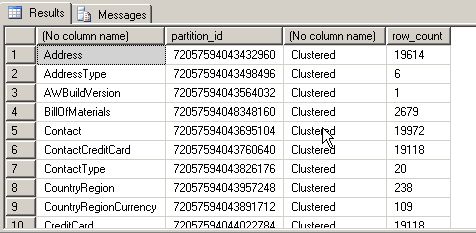
Same details we can get from sys.dm_db_partition_stats

SELECT Object_name (object_id),
       partition_id,
       CASEindex_id
         WHEN 0 THEN ‘Heap’
         WHEN 1 THEN ‘Clustered’
       END,
       row_count
FROM   sys.dm_db_partition_stats
WHERE  object_id > 100
       ANDindex_id IN ( 0, 1 )
ORDER  BY Object_name(object_id)

DMVs instead of DBCC Opentran

February 18, 2011

Those who are using SQL Server must be aware of dbcc opentran
After 2005 edition , SQL Server  is providing reach information in DMV.
For transactions 2 DMVs are available in SQL Server

1.dm_tran_database_transactions
Provide transaction information at database level
2.dm_tran_session_transactions
Provide transaction information at session level.

Lets look at how can we use it instead of dbcc opentran

first lets run

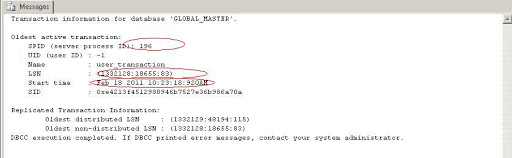
DBCC OPENTRAN


similar details we can get from DMVS , which provides much rich information thatn dbcc opentran

Lets look into this

SELECT dd.transaction_id,
       ds.session_id,
       database_transaction_begin_time,
       CASEdatabase_transaction_type
         WHEN 1 THEN ‘Read/write transaction’
         WHEN 2 THEN ‘Read-only transaction’
         WHEN 3 THEN ‘System transaction’
       ENDdatabase_transaction_type,
       CASEdatabase_transaction_state
         WHEN 1 THEN ‘The transaction has not been initialized.’
         WHEN 3 THEN ‘The transaction has been initialized but has not generated any log records.’
         WHEN 4 THEN ‘The transaction has generated log records.’
         WHEN 5 THEN ‘The transaction has been prepared.’
         WHEN10 THEN ‘The transaction has been committed.’
         WHEN11 THEN ‘The transaction has been rolled back.’
         WHEN12 THEN ‘The transaction is being committed. In this state the log record is being generated, but it has not been materialized or persisted’
       ENDdatabase_transaction_state,
       database_transaction_log_bytes_used,
       database_transaction_log_bytes_reserved,
       database_transaction_begin_lsn,
       database_transaction_last_lsn
FROM   sys.dm_tran_database_transactionsdd
       INNER JOIN sys.dm_tran_session_transactionsds
           ONds.transaction_id =dd.transaction_id
WHERE  dd.database_id = 5

We can see that this is much more information than we can get from dbcc opentran
with  same details its also provides database transaction type , database transaction state ,
log bytes used, log bytes reserved , lsn related details also



Design a site like this with WordPress.com
Get started