We have a table where we are dumping data on every 5 mins
Every 5 mins we are dumping approx 0.1 to 0.2 million rows
The tables has 5 indexes and we have a complaint that dump is getting slower over the time
It was taking 40-50 seconds , which needs to come down as we had to do other process after the dump
Solution
I checked the tables and could not find anything special
Only way to optimize is to work on Index. As I removed all the indexes the dump completed in 2 seconds
And once again I created all the indexes it took again 40-50 seconds.
AS its live table and being queried I can not remove indexes. So we decided to change the fillfactor to avoid splitting.
So we changed the fillfactor to 50 and effect is as per our expectation. The dump completes in 15 seconds.
As the index pages are created then they have 50% more space, so that there are now less chances of splitting compare to previous.
So it also attributes that page splitting is creating too much resource and time for large tables with heavy insert operations.
Archive for the ‘SQL Server Tuning’ Category
Impact of FillFactor
January 20, 2012Debug query in SSMS
July 7, 2011As we all are aware with debugging and have used it while testing our queries or troubleshooting . Now in SQL 2008 its possible to debug our queries in SSMS.
Its simple and easy. Lets see how to do it.
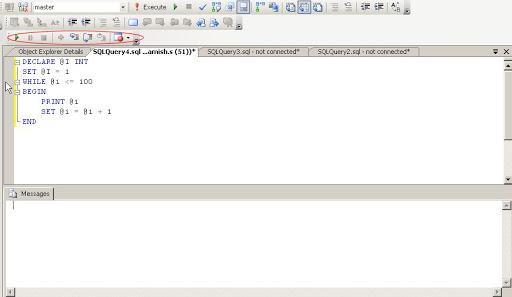
In toolbar we have toolbar of Debug , if not we can open it as below

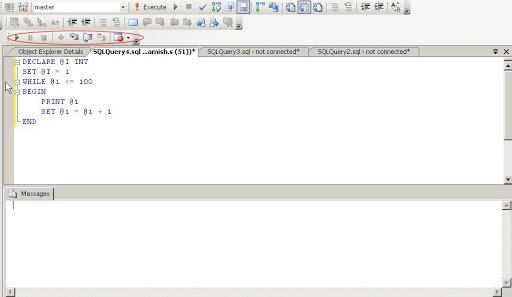
Now we will run below query in SSMS
Now start debugging as shown below
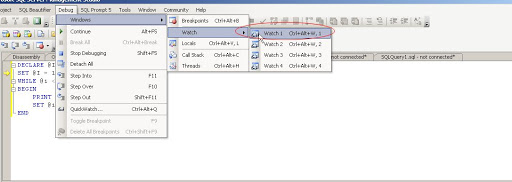
Open watch window as show below
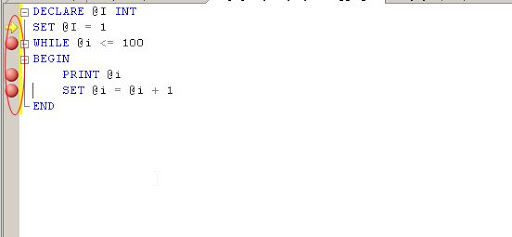
Now create breakpoints in the query, by clicking at starting of the row.
Type parameter @i in the Name field of watch window. Monitor the value of @i in the watch window.

Ok fine. Now I want to jump the value . I want to set its value to some new number
See below how to modify it. Modify it and start debugging.
Is it simple 🙂

Cahced Plans – Using System Tables
June 4, 2009Following query will give us info for the query text, object type , refcounts, usercounts for cached queries.
SELECT Db_name(t.dbid) db_name,
t.TEXT,
cacheobjtype,
objtype,
p.refcounts,
p.usecounts
FROM sys.dm_exec_cached_plans p
CROSS APPLY sys.Dm_exec_sql_text(p.plan_handle) t
WHERE dbid = Db_id()
ORDER BY cacheobjtype
- We can find which query is used most by usecounts column.
- We can find which plan is referred most
- We can find query type by objtype column
It has following values
Value Definition
=========================================
Proc – Stored procedure
Prepared – Prepared statement
Adhoc – Ad hoc query
ReplProc – Replication-filter-procedure
Trigger – Trigger
View – View
Default – Default
UsrTab – User table
SysTab – System table
Check – CHECK constraint
Rule – Rule
If its adhoc then we should consider to make it prepared, because adhoc is taking valuable space of ram which we can reduce if we can make it prepared.
How to find missing indexes- SQL Server
May 24, 2009But while number of person querying a table its not possible to track and analyze all queries.
In this case we need some metadata for all queries which shows us which queries does not have index and creating index can improve x% of performance.
Now its possible after SQL Server 2005
SQL Server has system tables which provides this metadata
sys.dm_db_missing_index_columns
sys.dm_db_missing_index_details
sys.dm_db_missing_index_groups
sys.dm_db_missing_index_group_stats
First we want to know stats of columns on which index can benenfit us.
sys.dm_db_missing_index_group_stats
It provides number of user_seeks and user_scans which can be benefitted from creating index. The high number of user_seeks and user_scan its more prone to new index.It also provides how much perfomance can be improved by avg_user_impact.Similary also provide info for system_seeks and system_scans and avg_system_impact for scans and seeks by system.We are generally more interested in user_seeks and user_scans.
sys.dm_db_missing_index_groups
It provides relationship between dm_db_missing_index_group_stats and dm_db_missing_index_details.
sys.dm_db_missing_index_details
It provides index column details for indexes suggested by dm_db_missing_index_group_stats.
sys.dm_db_missing_index_columns
Returns information for columns which are missing index.
Provides information for column name and column usage
Column usage
1. Equality — Columns which are used for Equality like a.col1 = b.col1
2. InEquality — Columns which are comared other than Equaltiy like a.col1 > b.col1
3. Included — Columns which are not part of comparison but part of query like covering index
While creating index we should first pue equality columns , then in equality column and then Included if we want to create covering index
USE adventureworks
DECLARE @i INT
SET @i = 1
WHILE @i <= 10
BEGIN
SELECT *
FROM sales.customer
WHERE customertype = 's'
AND territoryid = @i
SET @i = @i + 1
END
Now we will look into system tables for this query to find suggested indexes
First we need to find suggested index and number of user_seeks/user_scans
SELECT md.object_id,
md.database_id,
mgs.unique_compiles,
mgs.user_seeks,
mgs.user_scans,
mgs.last_user_seek,
mgs.avg_total_user_cost,
mgs.avg_user_impact,
md.equality_columns,
md.inequality_columns,
md.included_columns,
md.statement
FROM sys.dm_db_missing_index_group_stats mgs
INNER JOIN sys.dm_db_missing_index_groups mg
ON mg.index_group_handle = mgs.group_handle
INNER JOIN sys.dm_db_missing_index_details md
ON mg.index_handle = md.index_handle
WHERE md.database_id = Db_id()
AND md.object_id = Object_id('sales.customer')

Here we can see that number of user_seeks are 10, avg_user_impact is 88.2. It means if we create index the performance can be 88% improved. Its great!Now we will look at equality coulmns which are [TerritoryID], [CustomerType] and inequality columns are null.
So we need to create index on [TerritoryID], [CustomerType].
Create index idx_customer_TerritoryID_CustomerType on sales.customer([TerritoryID], [CustomerType])
Cheers.
 Lets SQL