Archive for the ‘SQL Tools’ Category

Debug query in SSMS

July 7, 2011

As we all are aware with debugging and have used it while testing our queries or troubleshooting .  Now in  SQL 2008 its possible to debug our queries in SSMS.

Its simple and easy. Lets see how to do it.

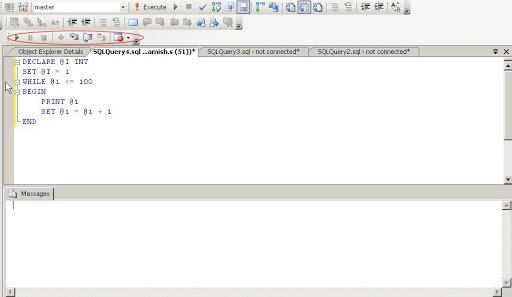
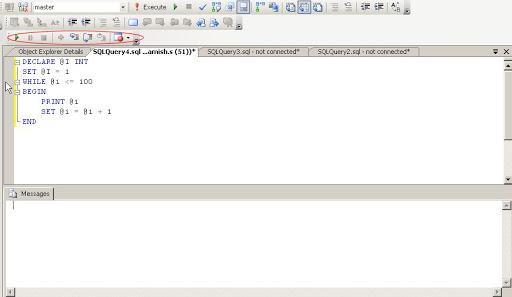
In toolbar we have toolbar of Debug , if not we can open it as below

Now we will run below query in SSMS

DECLARE @I INT
SET @I = 1
WHILE @I <= 100
    BEGIN
        PRINT@I
        SET @I = @I + 1
    END

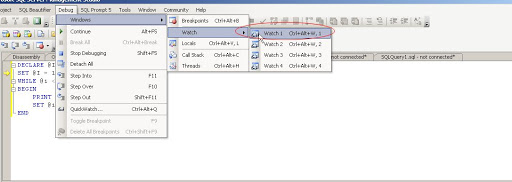
Now start debugging as shown below

Open watch window as show below

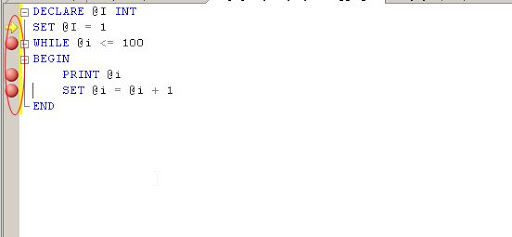
Now create breakpoints in the query, by clicking at starting of the row.

Type parameter @i in the Name field of watch window. Monitor the value of @i in the watch window.

Ok fine. Now I want to jump the value . I want to set its value to some new number
See below how to modify it. Modify it and start debugging.
Is it simple 🙂


Object Search in SSMS

June 11, 2011

As a  our database grows objects in the database also increases. During development we have to time to time get name of different objects  , for this we query system tables , but we can get this information from
SSMS object explorer details , quite easily. In object explorer details there is search window at top where we can find objects  and we can use wild cards also here 🙂

Diana Lite , a good utility to study Execution Plan

February 14, 2011

I came across a utility Diana Lite by  Daniel Zrihen . It is developed by nobhillsoft. Its a good utility and I think its fun to work with it and its a freebie 🙂

So I thought I should share it with you guys.

Useful information we can get out of a query execution plan

Much has been written about Query Execution Plans (we’ll call them QEPs), and how they can be used
for analyzing how SQL Server interprets your TSQL code and what it does behind the scenes –
information you can use to do such things as find bottlenecks, build indexes where they might help,
and generally improve the performance of your code.

Well, we have found more uses for it. There is more information in the QEP, information that’s not
typically used, yet is highly useful and very easy to retrieve:

1. IS YOUR CODE BROKEN?

TSQL code can get ‘broken’ all the time. You might be referencing tables or columns that don’t exist.
They might have even existed at the time you wrote the procedure, but have been removed since,
leaving your procedure ‘broken’ – It will raise an error next time its executed. How many of those do
YOU have in your database?

Now, if a code is broken, SQL Server will let you know about that when attempting to retrieve its
execution plan. Strictly speaking, this is not QEP information. Its information you will get while trying
to get the QEP. And that is not the only way to get that information. But it’s the easiest.

2. WHAT ENTITIES ARE USED IN FOR WHAT OPERATION?

Among all the logical and physical operations, and effects on memory etc, QEP also contains the very
basic information of what entities it is working with, and what it does on such entities. This
information can be then used to build a basic ‘browser database’, which you can use to answer
questions like: which code inserts to this table? I got data missing… which procedure removes records
from here?

In order to get any SQL’s execution plan in SQL Server, all you need to do is:

SET showplan_all ON

write your SQL here

SET showplan_all ON

If you get an error, this means the stored procedure is broken, and the error would say why.
Otherwise, you can get the execution plan in a tabular format, and retrieve the specific entities used
from it.

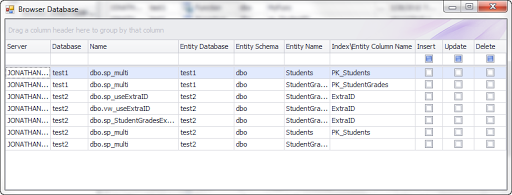
We put this functionality into one of our freebie products, Diana Lite. You can build the full ‘browser
database’ out of the collection of any database’s SQL Code, then easily filter it and get to whatever
you are looking for:

Sweet, Huh?

SQL Formatter

May 14, 2009

SQL Formatter

Recently I come across a beautifull tool SQL Fromatter Tool SQL Pertty Printer. A wonderful tool for us who are just living on SQL. As we all know properly formatted SQL can be better readable and understandable than unformatted query.
But for me it just a tidy process to format query with proper use of UpperCase and LowerCase for keywords. Here SQL Pretty printer comes. It formats your query as you want.

First I will put a sample so you can get idea how powerfull this tool is.

Unformatted code

select OBJECT_SCHEMA_NAME(object_id) as Schema_Name, case when grouping (OBJECT_NAME(object_id)) = 1 then ‘Total of tables’ else OBJECT_NAME(object_id) end table_name, COUNT(*)
from sys.columns
WHERE OBJECTPROPERTY(object_id, ‘IsUserTable’) = 1
GROUP BY OBJECT_SCHEMA_NAME(object_id), OBJECT_NAME(object_id)
WITH ROLLUP
having GROUPING(OBJECT_SCHEMA_NAME(object_id))<> 1
order by GROUPING (OBJECT_NAME(object_id)), COUNT(*)

Formatted Code


SELECT Object_schema_name(object_id) AS schema_name,

CASE

WHEN Grouping(Object_name(object_id)) = 1 THEN 'Total of tables'

ELSE Object_name(object_id)

END table_name,

Count(* )

FROM sys.columns

WHERE Objectproperty(object_id,'IsUserTable') = 1

GROUP BY Object_schema_name(object_id),

Object_name(object_id) WITH ROLLUP

HAVING Grouping(Object_schema_name(object_id)) <> 1

ORDER BY Grouping(Object_name(object_id)),

Count(* )

You can see how cool it is.

Now some cool feature of this tool

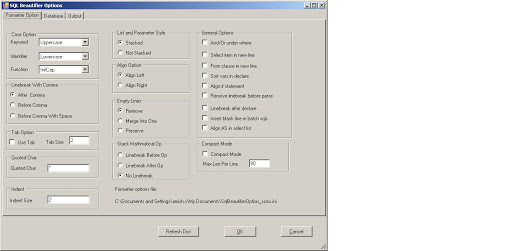
Like uppercase or lowercase or initcap for keywords,identifier and functions.
Lots of options like linebreaks, taboptions and alignments etc..

SQL Pretty Pritner is available web based also.

You can try it here

http://www.dpriver.com/pp/sqlformat.htm

I have installed it in my Management studio and I am enjoying it. Just write a query and format it using SQL Formatter.


Design a site like this with WordPress.com
Get started